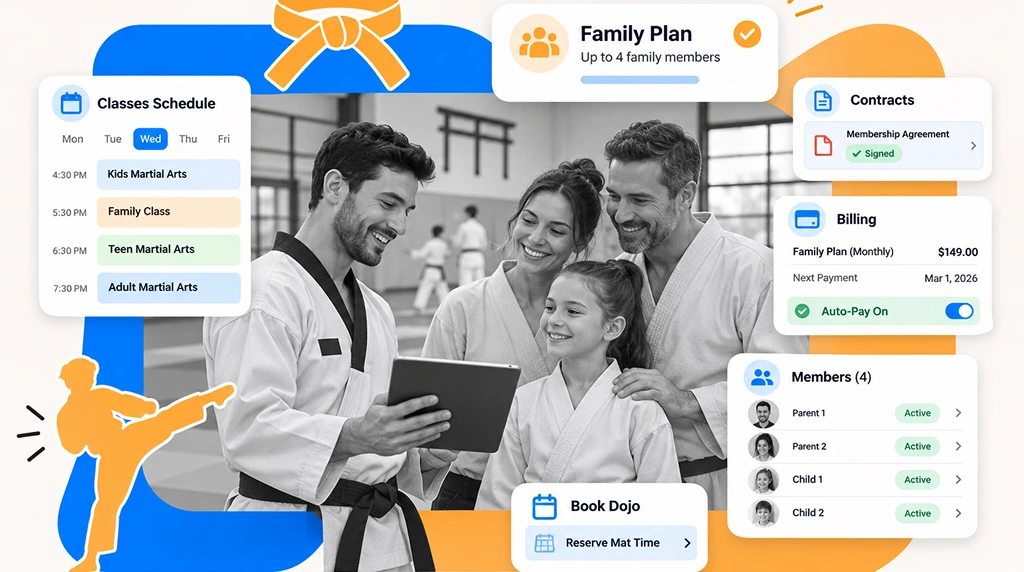
Karate school software runs a dojo’s students, kyu and dan ranks, classes and tuition in one system. Notebooks and spreadsheets tend to break around the first grading day with a full class, when you need attendance, eligibility and fees for dozens of students at once. If you are comparing options, this guide shows what to look for, and our page on martial arts school software covers the wider category.
What Karate Studio Software Does

Karate studio software is a single system that manages a dojo’s students, ranks, classes, attendance and payments. It replaces notebooks, spreadsheets and paper forms with one record for every student.
Unlike a standard gym, a karate school tracks kyu and dan ranks, runs belt tests, sells uniforms and often bills a parent for a child’s membership. Karate management software should cover:
- Student Management: This includes contact information, attendance history, rank and membership information.
- Belt and Rank Management: Set colored belts, stripes, tips, and black belt progress.
- Class Scheduling: Schedule classes for kids, teens, and adults.
- Attendance Management: Record and track student attendance and participation prior to grading.
- Memberships and Billing: Manage tuition, family accounts, and additional testing fees.
- Parent Communication: Give parents access to their children’s school and membership progress.
- Front Desk: Perform check-ins, process waivers and uniform sales, and sell sparring equipment.
Kyu and Dan Rank Tracking With Karate School Software

Karate schools should look for software that lets them create their own rank ladders, record their promotions, and detect students ready for grading.
Kyu Grades and Dan Grades and Stripes
Kyu grades represent student ranks before the level of black belt, and dan grades represent black belt levels. Some schools may also use colored belts and/or stripes to denote progress between grading examinations.
Rank structures also vary among different karate organizations. A Shotokan dojo may organize its ranks and curriculum differently from a Goju-ryu or Kyokushin dojo.
Your software should allow you to use your existing rank structures, progressions, and requirements, instead of rigid structures and systems. GymRoute lets you structure your ranks the way you want. You can set:
- Colored belts
- Stripes and tips
- Kyu grades and dan grades
- Each student’s promotion record
- Historic rank information
Because of the flexibility in the software, instructors can accurately record student progress as they advance from novice to expert levels.
Students and parents can see rank progress in the GymRoute member app, so parents do not have to ask the instructor for an update.
Belt Tests and Grading Days
Software should show you which students are ready to test, using attendance and training requirements, before grading day arrives.
Belt testing is a key aspect of running a successful karate school. Organizing and running a belt test requires clear communication, eligibility checks, and accurate record-keeping.
Instructors must know which students have met the prerequisites to take the test (attendance and training requirements) for a grading day.
The use of a school management system can help integrate the various records in a school (attendance, techniques, and ranking). With GymRoute, you can:
- Check student attendance before grading
- Track curriculum and technique requirements
- Identify students who are ready for the next test
- Record outcomes of grading
- Track student promotion and ranking history
Keep test fees and certificates with the same student record, so nothing depends on one instructor’s notes.
This is very useful to a school with multiple teachers teaching the same or different classes. Rather than teachers relying on their own notes to run classes, they can teach from centralized student records.
Managing Kids, Teens and Adult Programs

Karate school software should allow you to manage different programs without confusing student records and rank progression.
Consider a school that has the following programs:
| Program | Main requirements | What the software should handle |
|---|---|---|
| Little Dragons | Movement, basics, and techniques | Its own class group with class limits and a wait list, plus attendance reports for parents |
| Karate Kids | Discipline, fundamentals, and belt progression | A junior rank ladder and a grading eligibility check |
| Teen Karate | Intermediate and advanced techniques | Rank history and class schedules kept apart from the kids group |
| Adult Karate | Kumite, kata, and technical | Memberships and rank progression |
| Family classes | Shared class attendance | Linked family accounts |
| Private classes | Individual instruction | Flexible one-to-one scheduling |
Managing all of this manually is a challenge. Imagine a school with 100 students, multiple instructors, and a large children’s membership. The school may need to update parents about attendance, grading eligibility, and tuition payments.
A centralized student profile allows the dojo to manage all that information more easily. Parents and students can see rank and student progress information through the member app.
This information is especially important for junior black belt candidates who need to accomplish certain requirements before taking the exam. Teachers can manage participation for various age groups and organize class schedules and wait lists.
Kids rarely announce that they are quitting. They just stop showing up. Set a rule, such as a call when a student misses several classes in a row, decide whether the instructor or the front desk makes it, and keep the message simple: we missed you, is everything okay, here is the next class. GymRoute sends attendance alerts when a student’s attendance drops, so the instructor or front desk sees the pattern early.
Billing Tuition and Family Accounts

Karate school software should bill a family through one parent account, with one payer, one recurring payment and one bill for every child.
A lot of dojos utilize a recurring monthly membership model. Some provide discounts or family plans and charge differently for other products (uniforms, sparring gear, grading, etc.) Tracking different payment schedules becomes very difficult without a centralized payment system.
Picture a parent with three children attending the same dojo. Instead of three unrelated payment records, one family account links all of them, and nobody works out the sibling discount by hand.
Look for software that allows:
- Recurring monthly fees
- Individual student memberships
- Family accounts with a sibling discount
- Track payment history
- Extra fees for grading
- View membership status
- Get clear and organized billing records
GymRoute supports family memberships and recurring billing. A family shares one account and one recurring payment, while each student’s progress is tracked separately.
How Do You Charge Belt Test Fees?
Add the test fee to the student’s account when they are registered for the test, so it is paid before grading day instead of in cash at the door. For a family, the fee goes on the one family bill next to tuition. Charge certificates and new belts the same way.
Dojos usually collect test fees in one of three ways: cash at the door on grading day, a sale at the front desk, or a charge added to the student’s account. GymRoute supports all three. You can sell the fee at the front desk point of sale (Exceed plan and above), or add it to the student’s account and charge the card on file.
Check-In, Waivers and Front Desk Management
The front desk is often the busiest place in a karate school. Children arrive to class with little time to spare. Parents have questions and students gather their uniforms. Instructors prepare for the next class.
Faster Student Check-In
Students can check in by QR code, tap or phone, so the instructor does not need to manage paper lists.
Manual attendance sheets can create unnecessary delays, particularly when several classes start close together. Check-ins also build the attendance history that schools use for grading eligibility and promotion.
Parent Waivers for Kids
Schools usually need a parent or guardian to sign a waiver for every student under 18 before the first class. Rules differ by location, so check yours and ask your insurer. The signed waiver should sit on the student’s record, and one parent signing may cover several siblings if your form allows it.
GymRoute’s digital waivers let you collect forms digitally and find signed waivers again instantly. A parent or guardian can sign digital forms for a child, and signed waivers stay stored with the student.
Uniforms and Sparring Gear Sales
Managing the sale of the gear separately from membership information creates additional administrative tasks. Karate students often need a uniform (gi), belts, padded gloves, shin and foot guards, sparring helmets and shields, and training aids.
GymRoute supports point-of-sale and front desk activities, and can help you sell uniforms and gear.
| Front Desk Activities | What to Look For | GymRoute Capability |
|---|---|---|
| Student Arrival | Quick attendance registration | QR Code, Tap, or phone check-ins |
| New Student | Digital registration paperwork | Digital forms and waivers |
| Parent Administration | Student information | Member app |
| Equipment Sales | Products and payments | POS functionality |
| Organizing Classes | Schedule and capacity management | Waitlist and schedules |
Taekwondo Software and Other Striking Schools
Taekwondo software follows the same logic as karate software: gup grades before black belt and dan grades after, with colored belts, stripes and formal tests. GymRoute supports configurable colored belts, stripes and dan grades, so a taekwondo school can build its own ladder. Schools that teach BJJ or MMA have their own belt and class needs, and our guide to types of martial arts explains how the styles differ.
How to Choose Karate Management Software

The best karate software is the one that fits how your instructors teach and how your students progress, not the one with the most features.
A small, family-run dojo needs basic student management and tuition collection. A large school needs more sophisticated student management like attendance and rank tracking, and account management at the family level.
Use the following questions to help with your evaluation.
1. Can You Customize Your Belt Structure?
Find a solution that enables you to configure your school’s ranks and belts to meet your preferences. There should be options to configure intermediate stages with colored belts, stripes, and bars.
2. Can It Track Grading Eligibility?
Your software should help you track your students’ eligibility for testing and assist in preparing for grading days with attendance history and rank records.
3. Does It Support Children’s and Adult Classes?
Make sure your software allows you to differentiate children and adult classes with separate systems for students, memberships, and schedules.
4. Can It Manage Family Memberships?
Find out if it offers group accounts and family billing to simplify administration for you and your members.
5. Does It Simplify Front Desk Operations?
Your software should automate check-ins with QR codes, provide digital waivers, and integrate payment processing and scheduling.
6. How Does the Pricing Work?
Karate school software is usually priced in one of three ways: by bands of active members, per student, or as a flat plan. Watch for a price jump at a certain student count, grading tools offered only on higher tiers, card processing billed separately, and frozen members counting toward your tier. Also check contract conditions and upfront fees.
GymRoute prices by plan, not by student count: Excel at $99 a month, Exceed at $199 and Ultimate at $299, all with unlimited students and staff, no setup fees and no contracts.
Here is a quick comparison checklist:
| Feature | Why it matters | Priority |
|---|---|---|
| Custom rank tracking | Enables you to structure your own rank grading system | Essential |
| Attendance tracking | Helps you keep track of participation | Essential |
| Testing eligibility | Aids in organizing belt exams | High |
| Family billing | Simplifies sibling memberships | High |
| Class scheduling | Manages multiple programs | Essential |
| Digital waivers | Eliminates paperwork | High |
| QR check-in | Improves attendance process | Medium |
| POS | Helps in organizing uniform and equipment sales | Medium |
| Member app | Gives families access to student progress | High |
Before committing, evaluate the features you will use the most by requesting a demo.
Starting a Karate School? Set Up Your Software Early
To start a karate school, plan how you will run it before the first student enrolls: a training space, insurance, registration, waivers, a rank structure, class schedules and a way to collect payment. Many new owners begin with a notebook, a spreadsheet and a wall calendar, which can work for a handful of students. If you plan to grow, set up karate dojo software early, so student records, promotions and recurring memberships are already in one place when numbers rise. Your needs will depend on your teaching style, student numbers, instructors, grading frequency and share of children.
Running a Karate School on GymRoute
GymRoute runs the admin side of a dojo in one place. This is how one promotion works from start to finish:
- Check-in logs attendance for every class.
- GymRoute compares each student’s attendance and technique requirements with the level, so you can see who is eligible to test.
- You record the grading result.
- The student’s rank and rank history update, and parents see progress in the member app.
- The grading fee is sold at the front desk point of sale (Exceed plan and above) or added to the student’s account.
Plans start at $99 a month with unlimited students and staff, no setup fees and no long-term contracts.
Frequently Asked Questions (FAQs) about Karate School Software
What is karate school software?
Karate school software is a single system that tracks a dojo’s students, kyu and dan ranks, classes, attendance and tuition. It also handles belt test eligibility, family memberships, recurring payments, digital waivers and equipment sales, replacing notebooks and spreadsheets so instructors work from accurate student records.
What software do dojo owners use?
Many dojo owners start with a notebook or spreadsheet, then move to martial arts school software once rank tracking, grading days and family billing get hard to manage by hand. Look for software that lets you set your own rank structure and fits how your classes are billed.
Can karate software track kyu and dan grades?
Yes, if the rank structure is configurable. Good karate software supports colored belts, stripes and tips, kyu grades, dan grades and each student’s promotion history. GymRoute supports configurable colored belts, stripes and dan grades, so you can build the ladder your style uses.
Does karate software work for taekwondo?
Yes. Taekwondo follows the same rank logic as karate, with gup grades before black belt and dan grades after. As long as the software lets you set your own ladder, you can record promotions, organize classes and attendance and manage memberships the same way.
How do I bill families with several kids in karate?
Use family accounts, so one parent pays for all children with one recurring payment. Each child keeps their own attendance and rank record. Check that the software handles a child joining or leaving and adds grading fees to the family bill.
What do I need to start a karate school?
You need a training space, insurance, qualified instructors, a rank system, waivers and a way to take bookings and payments. Requirements vary by location, so check local rules or speak to a lawyer, as this is not legal advice. Martial arts school software helps once you grow.