Gym access control helps you decide who enters your gym and who does not. It connects your door system with your membership and billing software. If payment fails, access stops automatically. This protects your revenue and improves security. Modern systems support RFID cards, PIN codes, biometrics, and mobile app entry. They also help reduce staffing costs and enable 24/7 gym models. With proper setup, you can prevent fraud, stop tailgating, and track attendance in real time. A smart access control system turns your gym into a secure, automated, and scalable fitness business ready for future growth.
It is 5:58 a.m. Your gym is in quiet hours. No staff. No front desk. But the door is not fully secure. Someone pulls it open, trains, uses your showers, and leaves without paying.
By 7:12 a.m., the rush begins. Your team is handling calls, tours, class questions, and payment issues. Then you hear, “My membership is frozen, but I still got in yesterday.” Now the problem is bigger than a door. It affects revenue, safety, and staff time.
Weak entry systems cause:
- Unpaid or frozen members entering
- Tailgating
- Shared fobs or PINs
- Staff overload
- Member frustration
Gym traffic is rising. Check-ins increased sharply in 2024. The global fitness market is worth over $120 billion and is still growing. Yet average annual churn remains around 30–40%. You work hard to keep revenue stable.
When unpaid members enter, you lose money but still carry costs like rent, utilities, and equipment wear. Rising wages add more pressure.
Gym access control is not just security. It is a real-time business system that protects income, reduces chaos, and supports smart 24/7 growth.
What is gym access control?
Gym access control is a system that decides who can enter your gym and when. It replaces guesswork with clear rules.
If a member is active and paid, the door opens. If they are expired, unpaid, frozen, or canceled, the door stays locked.
This is also called membership access control. Because entry is tied to membership status.
Why it exists
A gym is a membership business. Entry is part of what members pay for.
If your entry is weak, your product can be taken for free. That is a revenue problem, not a “small admin issue.”
Access control also supports safely. You want to know who is inside, especially during quiet hours.
How it works
A modern gym access control system has two parts:
- Hardware: The device at the door (reader, lock, sensors)
- Software: The system that checks member status and rules
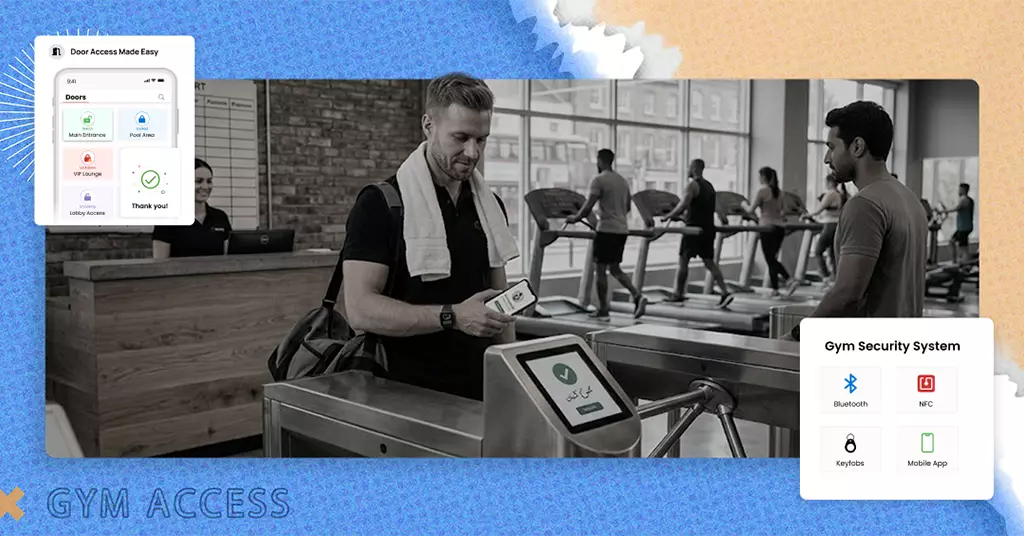
A member uses a “key” to request entry. That key can be:
- RFID card or key fob
- PIN Code
- Phone app (QR code, bluetooth, or tap)
- Fingerprint or face scan (biometric gym access)
The reader sends the request to the system. The system checks a member database and then approves or denies entry.
Real-time verification
Real-time means the system checks the status right now. So if a payment failed this morning, access can change this morning.
This matters because membership status changes daily:
- Payment fail
- Freezes start
- Cancellations happen
- Upgrades happen
- Day passes expire
A real-time check keeps your door honest.
Database connection
Think of the database like a list with rules:
- Is the membership active?
- Is the account paid?
- Are they allowed at this location?
- Are they allowed at this time?
- Are there special rules for their plan?
The access system checks this list every time someone tries to enter.
Entry approval or denial (after logging)
When the entry is approved, the local releases. When entry is denied, the door stays locked
A good system also logs the attempt:
- Who tried to enter
- Which door
- What time
- Whether it was approved or denied
Those logs help you spot patterns, problems, and misuse.
Example:
Sam has a monthly plan. Their card payment fails on Tuesday. Your billing marks the account overdue.
One Wednesday, at 6:10 a.m., Sam tries to enter.
- With weak access control, Sam walks in anyway
- With synced access control, Sam is denied and gets a message to update the payment
The rule is applied the same way every time. No arguments. No awkward front desk conversation.
Why this matters even more
The market is growing and getting more competitive. One estimate puts the global health and fitness club market at $121.19B in 2024 and $131.31B in 2025.
Global performance data also shows growth in key areas. The Health & Fitness Association’s reporting notes that in 2024, global memberships rose 6%, revenue rose an average of 8%, and facility counts increased nearly 4%.
More members and more visits mean your entry system matters more, not less, because the door is where rules meet real life.
Want to learn more?
Discover how smart access control helps gyms improve security and streamline operations in our article: Why Every Modern Fitness Center Needs a Smart Access Control System.
Why gym access control is no longer optional
Access control used to feel like a “nice upgrade.” Now it is basic protection for most gyms.
Five big changes drive this shift:
- More 24/7 access expectations
- Higher labor costs
- Higher member expectations for self-service
- More security risk during unstaffed hours
- More revenue leakage through weak entry rules
1. The rise of 24/7 gym access
Many gym models now compete on flexibility.
Members want to train early, late, or whenever life allows. Operators also want hours that match demand without adding staff cost. That pushes more gyms towards unstaffed or low-staff hours.
Industry reporting points out that growth is happening across models, including budget gyms and 24-hours clubs.
So access control becomes the “always-on gatekeeper” that keeps the business safe.
2. Staff costs are rising
Suppose your only protection is a staff member watching the door; that gets expensive. And wage pressure is real in many markets.
- In the UK, the national living wage for 21+ rose from £11.44 to £12.21
- In the US, the median annual wage for fitness trainers and instructors was $46,180
Even if front desk pay differs from trainer pay, the point is simple. Hiring and keeping good people costs more now than it used to.
3. Members expect fast, self-serve entry
Members are used to phone-based access in daily life. They expect to enter the workforce.
This matters because gyms are seeing higher use again. ABC Fitness reported 60% higher check-ins in Q1 2024 vs Q1 2023 for traditional gyms.
More traffic means lines and frustration if entry is slow. A good keyless gym entry system reduces bottlenecks.
4. Security risk goes up when the entry is weak
Tailgating is one of the most common ways unauthorized people enter controlled spaces.
Security firms describe tailgating as a common breach where someone follows a valid user into a restricted area.
Gyms face the same risk, especially in unstaffed hours. And real-world warnings do exist.
City of London police have warned about thefts targeting gyms and customers, including thefts after tailgating genuine customers.
While preventing unauthorized access is important, entry systems also play a key role in the member experience. Learn more in How Gym Scan-In Systems Improve Member Experience and Retention.
5. The revenge league is easy when the rules are not enforced
This is the silent killer. A few unpaid entries a day can feel “small.”
But gyms already deal with high churn. A common benchmark puts average churn around 30-40% per year, with some gyms higher.
So you are already running hard to keep your member base stable. Letting the door leak makes that job harder.
The business impact
Weak access control usually shows up as:
- More unpaid usage
- More shared access
- More tailgating
- More staff time wasted
- More member complaints
- More risks in quiet hours
If you are building for growth, this is not optional. It is a part of running a clean operation.
Types of Gym Access Control Systems
There are two things to choose from:
- How members prove who they are (RFID, PIN, mobile, biometric)
- How the door is controlled (magnetic lock, strike, turnstile, gate)
You want a system that fits your gym, your risk level, and your vibe.
RFID Keycards
RFID means the card or fob sends a short signal to a reader. The reader checks if the member is allowed in.
How it works
A member taps the card or key fob near the reader. The system checks the status and unlocks the door if allowed.
Pros
- Fast entry
- Easy for most members
- Hardware is common and proven
- Good for busy gyms
Cons
- Cards can be shared
- Cards can be lost
- Replacement admin adds up
- weak if not synced to billing
Best for
- High-traffic commercial gyms
- Gyms that want a simple entry method
- Facilities where staff can re-issue cards easily
Good tip that reduces sharing
If you use RFID, pair it with clear rules and logs. If you spot one fob being used in odd patterns, you can act fast.
PIN Code Entry
Members type a code on a keypad. The system matches the code to a member account.
How it works
Member enters a PIN. System checks rules and unlocks if valid.
Pros
- No card needed
- Low-cost hardware
- Easy to give temporary codes
- Simple for staff
Cons
- PINs spread easily
- Shoulder-surfing happens (people watch others type)
- Codes can get shared in group chats
Best for
- Small studios with low misuse risk
- Staff-heavy gyms where the door is watched
- Side doors with limited access
Simple way to make PIN safer
- Use unique PINs, not one shared PIN.
- Change PIN rules if misuse becomes common.
Biometric (Fingerprint & Facial Recognition)
Biometric gym access uses a body feature as the “key.” The system matches a fingerprint or face pattern to a stored template.
How it works
Member scans a finger or face. System matches the template and unlocks.
Pros
- Hard to share
- Strong link between person and entry
- Fast once setup is done
- Reduces “friend entry” a lot
Cons
- Privacy concerns for some members
- The setup needs clear consent and good handling
- Face readers depend on lighting and placement
- Some people prefer not to use it
Best for
- 24/7 gyms
- Gyms with serious misuse problems
- Premium gyms that want strong identity checks
Simple privacy note
A good system stores a “template,” not a photo. Still, you should explain this clearly and follow local privacy rules.
Mobile App & QR Code Access
Members use a phone to enter. This can be QR code scanning, Bluetooth, or tap-to-unlock.
How it works
Member opens the gym app and uses:
- A QR code shown on screen, or
- A phone signal that the reader detects
Pros
- No cards to print
- Easy to update rules
- Great for self-service
- Fits modern member habits
Cons
- Phones die
- People forget their phones
- QR codes can be shared if they do not change often
- Onboarding must be clear
Best for
- Modern gyms and studios
- Multi-location brands
- Gyms that want keyless gym entry without biometrics
A strong QR rule
Use QR codes that refresh often (time-based). This reduces “screenshot sharing.”
Turnstiles vs Magnetic Locks
This is about the door control style. It works together with RFID, PIN, mobile, or biometric.
Turnstiles (or speed gates)
A turnstile is a physical barrier that controls entry flow. It is one of the best tools against tailgating.
Pros
- Strong anti-tailgating
- Clear “one scan = one entry”
- Good for unstaffed entry zones
- Good for high traffic
Cons
- Higher cost
- Needs space
- Can feel too “industrial” for some boutique brands
- Installation is more involved
Best for
- Big gyms
- 24/7 gyms with repeated misuse
- Clubs near transport hubs with heavy traffic
Magnetic locks (mag locks)
A mag lock uses an electromagnet to hold the door shut. When access is approved, it is released for a short time.
Pros
- Common and reliable
- Works on many doors
- Clean look when installed well
- The cost is often lower than that of turnstiles
Cons
- Tailgating can still happen
- Needs safe exit planning
- Needs backup power planning
- Must follow local fire and safety rules
Best for
- Most gyms with standard entry doors
- Doors where you can manage tailgating with rules + sensors + CCTV
Quick choice guide
- Tailgating is a big problem → turnstile
- You want a standard door setup → mag lock + good rules
Key features to look for in a modern access control system
Many gym owners shop for hardware first. That often leads to regret. The best results come from software rules + clean integration.
Hardware is just the tool that follows the rule. You should be assessing a gym access control on the following basis:
Real-time membership validation
This is the foundation. Your access control guide can be one sentence here:
If billing says, “inactive,” the door must say “no.”
Look for validation that checks:
- Unpaid accounts
- Expired memberships
- Frozen plans
- Cancelled plans
- Failed payment status
24/7 automation
If your goal is growth, you need an entry that works at any hour. That means the system must run without constant staff help.
A useful data point on automation is often missed. One Deloitte data point notes gyms in Europe operate about 116 hours per week, with staff present 84% of the time, and the rest typically covered by automated systems, averaging 2.6 hours.
Even if your gym is not in Europe, the message is clear. Automation is already a normal part of gym hours.
Billing integration
Billing integration means that payments and access talk to each other. So access updates are automatic.
You want rules like:
- Payment fails → Access changes
- Freeze starts → Access changes
- Cancellation → Access ends
- Upgrade → Access expands
This is how you stop “frozen but still entered.”
Attendance tracking
Every entry should create a clean record. This helps you understand:
- Peak hours
- Low-use members
- Staff vs member entry patterns
- Unusual access attempts
Multi-location support
If you have more than one location, you need one control center. You want:
- One member profile
- Location-based rules
- Easy access upgrades (one site vs all sites)
- Clear reports per location
Custom access rules
Not everyone should have the same access. A good system supports rules like:
- Staff: Anytime
- Cleaners: 2 a.m. to 5 a.m. only
- Day passes: Valid for 24 hours
- Guests: One entry only
- PT clients: Allowed only during booked time
Remote monitoring and alerts
Remote monitoring means you can see door status and activity without being on-site.
That matters when:
- A member says the door failed
- A lock is stuck
- A door is helping open
- You want to confirm entry logs
Good alerts to look for:
- The door held open too long
- Repeated denied attempts
- High traffic at odd hours
- Tamper alerts
Emergency override
Sometimes you must unlock a door quickly. But overrides should be controlled and logged.
Good system offer:
- An admin unlock feature
- A physical emergency release plan
- A log of who used the override and when
How gym access control protects your revenue
Gym access control is a revenue system in disguise. It reduces free use and removes “leaky” processes.
1. It blocks expired, unpaid, and frozen members
The biggest revenue leak is simple. People who should not have access still enter.
If access is synced to membership status, the system enforces the rule every time. That consistency protects income and reduces awkward front desk debates.
2. It reduces tailgating
Tailgating is easy to ignore until it becomes normal. Then it becomes a habit in your building.
Security companies describe tailgating as a common way unauthorized people enter by following someone with valid access. Gym faces this too, especially at busy times and during unstaffed hours.
Ways to reduce tailgating without changing your whole layout:
- Shorten door unlock time
- Add a door-close sensor
- Use clear signage
- Place CCTV to view the entry lane
- Review logs for odd patterns
If tailgating is constant, a turnstile can be the cleanest fix. It sets a physical rule, not just a policy rule.
3. It reduces shared access and fraud
Fraud in gyms is often not dramatic. It is small and repeated.
Common examples:
- Two people share one fob
- One PIN is used by many
- A QR code screenshot gets shared
- A canceled member keeps getting in due to admin mistakes
Biometric access reduces the sharing the most. Mobile access can also reduce sharing if QR codes refresh often.
4. It reduces manual errors
Manual systems depend on staff remembering steps. That is not a stable process.
Common mistakes include:
- Forgetting to turn off access after cancellation
- Turning off the wrong person
- Leaving expectations in place “for now.”
- Not syncing access with billing changes
A connected system reduces these mistakes. Rules run automatically, even when staff are busy.
What unpaid entry really cost
Let’s keep the math easy and realistic.
You have 200 members. The average plan price is $50/month.
That is:
- 200 × $50 = $10,000/month in membership revenue
Now, let’s say you have 10 unpaid entries per day. This can be tailgating, shared access, or overdue accounts.
Over 30 days:
- 10 × 30 = 300 unpaid visits/month
If even one-third of those visits represent people who should be paying, that is 100 “paid-equivalent” visits.
If the average member comes about 8-12 times a month, those visits can equal 8-12 memberships’ worth of use.
Even at 8 memberships:
- 8 × $50 = $400/month leaking
And that does not include the hidden costs:
- Equipment wear
- Utilities
- Staff time
- Safety risk
How access control reduces staffing costs
Good access control does not replace good services. It removes the need to staff the door to prevent free entry.
Staff-less hours
Access control allows:
- Early morning access
- Late-night access
- Weekend access with fewer staff hours
- Safer 24/7 gym access
That supports growth without forcing payroll to grow at the same rate.
Less front desk “door support.”
When access is synced and stable, staff spend less time on:
- Reactivity accounts manually
- Fixing “my card stopped working” issues caused by bad data
- Letting people in as a one-time expectation
- Chasing payments at the door
That time can move to:
- Tours
- Sales follow-up
- Member care
- Facility standards
A real cost signal from a scaled operator
Large, low-cost operators focus hard on controlled operations. For example:
Basic-Fit’s FY2024 reporting shows total revenue of €1215.2 M and club personnel costs of€191.7 m.
Your gym may not run the same model. But the lesson still helps: labor is a major cost, and controlled systems protect margin.
The simplest staffing win
The biggest staffing win is not “zero staff.” There are fewer forced shifts to watch the entry.
You can still keep staff for:
- Service
- Sales
- Community
But if you stop paying staff to do the job, a door system can do better.
Gym access control for different types of fitness businesses
Your best setup depends on your model. Below are clear, practical fits.
Commercial gyms
These gyms have steady daily traffic and mixed member types. They usually do best with:
- RFID or mobile entry
- Strong billing sync
- Attendance tracking
- Door sensors and CCTV at the entry
Example:
A busy gym sees repeated “friend entry” during peak hours. Mobile access with changing QR codes reduces sharing, and logs help spot misuse.
Boutique studios
Boutiques often care about speed and feel. They usually do best with:
- Mobile check-in
- Staff-led entry during class times
- Access windows tied to bookings
Example:
A studio open access 15 minutes before class and closes 10 minutes after. This reduces the random walk-ins and protects the class experience.
24/7 gyms
24/7 gyms need stronger controls because staff are not always present. They often do best with:
- Biometrics or secure mobile entry
- Door-held-open alerts
- CCTV focused on the entry
- Remote admin tools
Example:
A 24/7 gym uses biometric entry to stop sharing. If the door is held open, the manager gets an alert and can act fast.
CrossFit boxes
CrossFit gyms often have tight communities and group training. That can increase sharing if the entry is relaxed.
Good fit systems:
- Mobile access tied to account status
- Clear coach/ staff access rules
- Class-time access windows if needed
Example:
Members can enter only during scheduled access times unless they are staff. This supports safety and keeps the space controlled.
Hybrid gym + spa
These businesses need zone control. You may need a separate access rule for:
- Gym floor
- Treatment rooms
- Staff-only areas
- Private zones
Good fit systems:
- Zone-based permissions
- Strong staff roles
- Logs per door
- Easy temporary access for therapists
Example:
A member can enter the gym zone, but spa rooms are controlled by staff access only. This reduces risk and keeps quests experience calm.
Step-by-step guide to installing gym access control
This is the practical gym access control installation plan. If you follow these steps, your setup is far more likely to work long-term.
Step 1: Define the real goal
Pick 2-3 clear goals. Do not try to solve everything at once.
Common goals:
- Stop the unpaid access
- Support 24/7 hours
- Reduce tailgating
- Reduce front desk load
- Track attendance automatically
Write the goal down. You will use them to choose the right system.
Step 2: Map your doors and zones
List every door that matters:
- Main entry
- Side entry
- Staff door
- Emergency exits
- Internal doors
Then mark:
- Which doors need access control now
- Which doors can wait
This prevents over-buying. It also prevents missing a weak door that people will use.
Step 3: Choose the entry method
Pick one primary method:
- RFID
- Mobile
- PIN
- BioMetric
Then choose a backup method for edge cases:
- Phone dead
- Card lost
- Biometric not reading
A backup plan is important. But it must not become a security hole.
Step 4: Choose the door control hardware
Most gyms choose one of these:
- Mag lock on a normal door
- Electric strike on a latch door
- Turnstile or speed gate for anti-tailgating
Also plan for:
- Door closer
- Door contact sensor
- Request-to-exist device
Step 5: Decide where the controller and power will sit
This step matters for reliability. A controller is the small “brain” that connects the reader to the local.
Good placement rules:
- Keep it in a secure spot
- Keep wiring clean and protected
- Keep access for maintenance simple
Many gyms place controllers near the front desk or in a locked comms area. The goals are short, safe cable runs and easy service access.
Step 6: Plan membership + billing sync rules
This is where most revenue leaks are fixed.
Set clear rules like:
- Payment fails → Access denied after a short grace period
- Freeze starts → Access denied until reactivated
- Cancellation date reached → Access ends automatically
- Upgrade purchased → access updates instantly
Do not rely on staff “remembering.” Make it automatic.
Step 7: Set your access schedule rules
Decide:
- Member access times
- Staff access time
- Vendor access times
Common schedule examples:
- Members: 24/7
- Cleaners: 2 a.m. to 5 a.m.
- PT contractors: 5 a.m. to 10 p.m.
Rules reduce risk without adding staff hours. And they create consistency.
Step 8: Add anti-tailgating basics
If you are not using a turnstile, do this:
- Set the unlock time short
- Install a door closer
- Add a door-held-open alert
- Ensure CCTV can see the entry
These steps reduce casual misuse. They also create evidence when misuse happens.
Step 9: Plan backup power and safety behavior
Power cut happens. You need a plan that keeps you safe and keeps your site controlled.
Typical options include:
- UPS/battery backup for the controller and lock
- Fire alarm integration where required
- Emergency release method for safe exit
This is not optional. Follow local fire and building rules.
Step 10: Install, then test real situations
Do not test only the “happy path” entry.
Test the real problems you will face:
- Expired member tries entry
- An unpaid member tries entry
- Frozen member tries entry
- The door is held open for 30 seconds
- The internet drops briefly
- Power drops briefly
- The member tries to tailgate behind a valid scan
- Staff override is used and logged
Fix every failure before launch. A clean launch prevents weeks of chaos.
Step 11: Train staff with simple scripts
Staff training should be short and practical. Give them scripts for common cases:
- “Your payment did not go through. Here is how to update it.”
- “Your membership is paused until X date. We can unpause now if you want.”
- “Entry is one scan per person. Please do not hold the door.”
Training reduces conflict. It also prevents staff from creating risky workarounds.
Step 12: Communicate to members before go-live
Members do not hate rules. They hate surprises.
Send a clear message:
- Why did you add it (fairness + safety)
- How to use it (steps + images)
- What to do if it fails (support path)
- What is not allowed (sharing + tailgating)
Make it simple. Two minutes of reading should be enough.
Step 13: Launch in phases
A stable rollout often looks like:
- Week 1: staff assist at peak times
- Week 2: tighten rules and reduce exceptions
- Week 3: review logs and adjust timing
- Week 4: expand to more doors or add upgrades
Phasing reduces stress. It also helps you catch issues early.
Common mistakes gym owners make
These mistakes are common because they feel “small.” But they create long-term leaks.
Choosing the cheapest hardware
Cheap locks and readers fail more often. When entry fails, your staff becomes tech support.
Treating software like an add-on
If your door system is not synced to billing, you still have:
- Unpaid access
- Manual exceptions
- “We’ll fix it later,” accounts
That is where revenue leaks hide.
Ignoring tailgating until it becomes normal
Tailgating spreads fast because it feels “friendly.” Then it becomes expected.
Fix it early with:
- Better timing
- Better door behavior
- Clearer rules
- Physical control if needed
No backup power plan
A power cut can create:
- Locked-out paying members
- Unlocked doors during quiet hours
- Safety issues
Plan it before launch, not after.
Not training staff
Staff will create workarounds when busy. Workarounds become habits.
Habits become leaks.
Not telling members clearly
Members need simple instructions. Confusion creates complaints, not loyalty.
Security best practices
A gym security system is strongest when access control is part of a simple plan.
Not a complicated one. Just the basics done well.
Anti-tailgating best practices
Use a mix of:
- Short unlock time
- Door closer
- Door-held-open sensor + alert
- Visible CCTV at the entry
- Signage that is clear and calm
Tailgating is a known risk pattern across controlled spaces.
Gyms also face it, and police warnings have referenced tailgating as part of theft methods in gyms.
CCTV placement that actually helps
CCTV helps most when:
- It clearly sees faces at the entry
- It covers the door and entry lane
- It is well-lit
- It is easy to review when needed
CCTV is not just for “after something happens.” It also reduces misuse because people know it exists.
Door-held-open alerts
This is a simple, high-value feature. If the door is propped open, you want to know fast.
Set a rule like:
- Alert if the door is open longer than 20–30 seconds
This catches:
- Propping
- Stuck latches
- “Someone forgot to shut it.”
Backup power
At minimum, plan backup for:
- Controller
- Lock power
- Reader
- Network device (if needed)
This keeps your system stable during short outages. It also prevents entry chaos.
Data privacy (especially with biometrics)
If you use biometric access, keep it simple:
- Explain what data is stored
- Limit admin access
- Secure the system
- Follow local privacy rules
You do not need to scare members.
You need clear, honest answers.
Emergency exits and compliance
Emergency exits must work safely. Access control must never trap people inside.
Plan for:
- safe exit devices
- emergency release methods
- local code requirements
If you are unsure, check with a qualified installer. This is not the place to guess.
Cost Breakdown and ROI
Costs change by:
- Number of doors
- Door type
- Entry method
- Turnstile vs standard door
- Install complexity (wiring, building layout)
Still, you can plan with clear buckets.
Hardware costs
Hardware often includes:
- Reader (RFID, keypad, biometric, mobile reader)
- Controller
- Lock (mag lock, strike, gate, turnstile)
- Power supply
- Sensors and exit hardware
One vendor guide notes that basic systems can start around $500 in hardware, while advanced systems with biometrics and turnstiles can go much higher (into thousands).
Treat this as a range, not a promise. Your real number depends on your doors and build.
Software costs (monthly)
Software may include:
- Access control platform
- Member database connection
- Billing sync
- Mobile access features
- Reporting and alerts
This is where long-term value often lives. A cheap system without real rules is not a bargain.
Installation costs
Installation cost depends on:
- Wiring runs
- Door frames and mounting
- Power and network setup
- Testing time
- Safety integration needs
Good installers test properly. That time is worth paying for.
Maintenance and support
Plan for:
- Replacement fobs/cards
- Occasional reader replacement
- Locks wear over time
- Software updates
- Support time
Maintenance is normal. The goal is predictable maintenance, not constant firefighting.
ROI example (simple and practical)
Let’s use the earlier “leak” example. If access control stops:
- $400/month for unpaid use
That is:
- $4,800/year protected.
Now add just one more gain:
- Fewer staff hours spent fixing door issues
- Fewer manual billing disputes at entry
- Cleaner retention works because you trust your data
In many gyms, payback can happen within months. It is often faster in 24/7 models.
Looking for a deeper dive into gym access control technology? Explore our complete guide to understanding access control systems and how they support safer, more efficient fitness facilities.
The Future of Gym Access Control (2026 and Beyond)
Access control is moving from “door lock” to “operations layer.” It is becoming part of how gyms run.
AI facial recognition (with clear rules)
More systems are adding face entry. It reduces sharing and speeds up entry. But privacy must be handled well.
Clear consent and secure storage are key.
Unmanned gyms and remote operations
Research and industry discussion note the growth of unmanned gyms and the role of smart access control, like facial recognition and QR scanning, plus remote systems.
This does not mean every gym should be unmanned. But it shows where the market is moving.
More cloud-based control
Cloud tools make it easier to:
- Manage multiple locations
- Change rules fast
- Monitor doors remotely
- Run better reporting
This supports scaling without adding messy systems.
Wearables and new “keys.”
Over time, entry may shift more to:
- Watches
- Wearables
- Secure phone tokens
The “key” becomes whatever members already carry. That improves compliance and ease.
Frequently Asked Questions (FAQ)
1) What is the best gym door entry system for a small gym?
If you are staffed most hours, RFID or mobile access is usually enough. If sharing is common, use stricter rules or biometric entry.
2) Can access control stop frozen members from entering?
Yes, if access is synced to billing in real time. That sync is what makes membership access control work.
3) What is keyless gym entry?
Keyless gym entry means no physical card is needed. It is usually mobile app access or biometrics.
4) Do I need a turnstile?
Not always. Turnstiles help most when tailgating is frequent. If tailgating is rare, a standard door with good rules may be enough.
5) What if the internet goes down?
Good systems can keep basic rules for a short time. Ask vendors how offline mode works and test it during setup.
6) Is biometric gym access safe?
It can be safe if templates are stored securely and access is controlled. You should also follow local privacy rules and explain the process clearly.
7) How do I reduce tailgating without a turnstile?
Use short unlock times, door closers, door-held-open alerts, and CCTV. Also, make the rule clear to members and enforce it consistently.
8) How long does installation take?
A one-door setup can be quick, but multi-door installs take longer. Testing and training often take as long as the physical install.
Final thoughts
Gym access control is not just a lock. It is a system that protects your business rules every day.
If your door is easy to bypass, you will face unauthorized access, tailgating, shared entry, staff stress, and member complaints. And this matters more now than ever.
Gym traffic is rising. Check-ins increased sharply in 2024, meaning more door activity and more chances for problems. The global fitness market is worth over $120 billion and is still growing. Yet annual churn often sits around 30–40%. You cannot afford preventable revenue leaks.
A strong access control system should:
- Validate memberships in real time
- Block unpaid or expired accounts automatically
- Reduce tailgating and shared access
- Log entries for visibility
- Support 24/7 access smoothly
When set up correctly, it works quietly in the background. It applies rules fairly. Paying members feel protected. Staff stop solving the same door issues daily. Growth becomes easier because your basics are secure.
Ready to Upgrade Your Gym Access Control?
If you want more than just a door lock, you need software that connects entry with billing and member data. GymRoute links real-time access control with membership status, 24/7 automation, multi-location management, and attendance tracking. So your door and your revenue stay aligned.
Book a demo with Gymroute and see how clean access control looks when it is connected to billing, member data, and day-to-day operations.